Your campaign is bringing visitors in, but the coupon excludes the product in the advert. Another shopper sees an old price. A third has paid and cannot tell whether the order succeeded. Each problem becomes harder to investigate while customers are waiting and the campaign is spending.
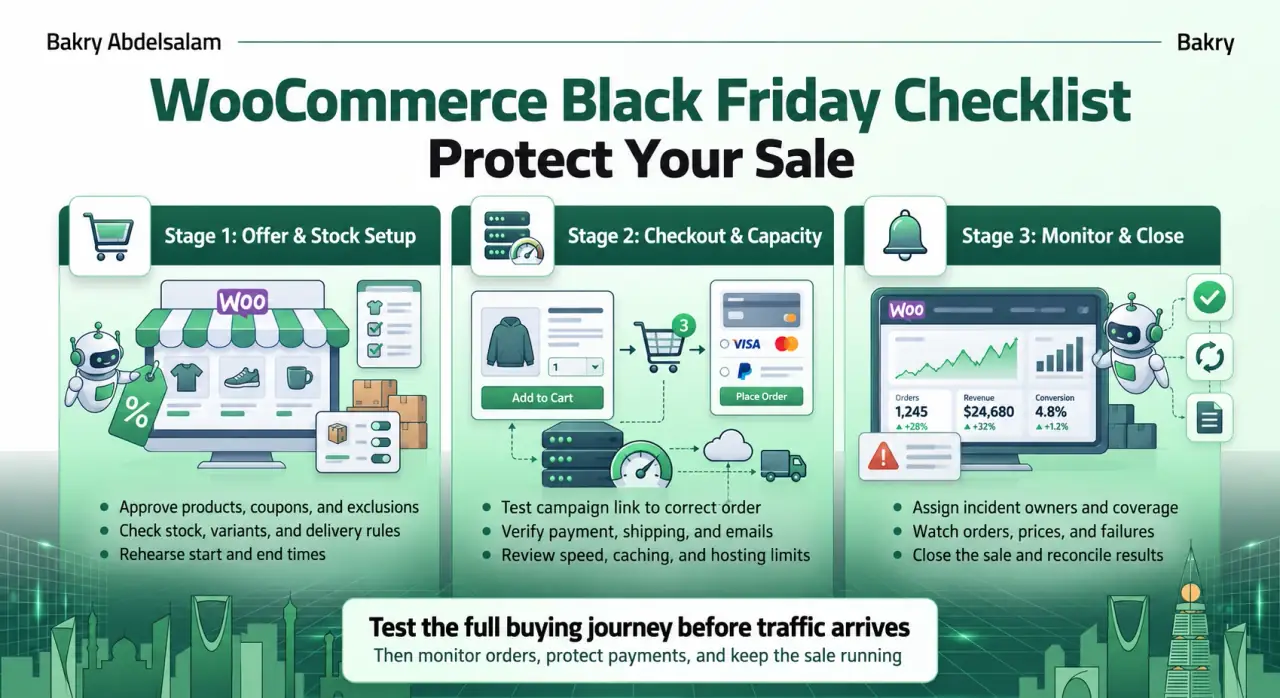
This WooCommerce Black Friday checklist starts with a practical objective: prove that the advertised offer works from the campaign link to a correct order, then agree how the team will keep it working. A new homepage banner or a strong speed score for one page cannot establish that readiness.
Use the guide to brief your developer, hosting provider and store team. The downloadable sale preparation worksheet gives you a place to record outcomes, evidence and responsibility.
For the campaign’s presentation, use the Black Friday website design 2026 guide to plan homepage changes, offer pages, product cards and mobile usability, then validate the release with this checklist.
When should you prepare your WooCommerce store for Black Friday?
For 2026, Black Friday falls on 27 November; it is also listed as White Friday in Salla’s regional merchant calendar, in Arabic. Your promotion may start earlier or run longer. Write down its actual start, end and reference timezone.
If you are planning in October, tackle work that needs investigation now: broken orders, unclear discount rules, capacity limits or a payment integration that does not update correctly. Prioritise by business impact and provider dependencies rather than saving every change for the final evening.
Adapt this suggested sequence to your store and sale scope:
| Stage | Work to complete | Evidence for approval |
|---|---|---|
| Early preparation | Agree promoted products, offer rules, stock and repair scope | One written offer sheet with named decision owners |
| Before advertising, with time for fixes | Rehearse offers and purchasing; review operating capacity | Recorded outcomes and successful retests of blocking issues |
| Final days | Confirm schedules, links, messages and change control | Approved version, response contacts and coverage arrangements |
| During and after the sale | Watch orders and availability, close offers and reconcile results | Event log and checked order, payment and price records |
These are planning stages, not a universal delivery promise. With limited time, start with the most important offer and buying journey, then agree what can wait.
1. Specify the offer before configuring the tools
Create one approved offer sheet covering:
- Included products and purchasable variants, with explicit exclusions.
- Whether the offer uses sale prices, a coupon, a bundle or free shipping.
- Whether another coupon can be combined with it and whether sale items qualify.
- Per-customer limits, total usage limits and minimum spend.
- Start and end times and the stock available for the offer.
- What the shopper sees when the offer or option becomes unavailable.
WooCommerce’s coupon settings include individual-use restrictions, sale-item exclusions and usage limits. Configure the approved rules, then verify the outcome in the basket. An extension’s name does not explain how it interacts with your existing pricing tools.
Test an eligible basket, an ineligible one, a mix of included and excluded products, a second coupon and an unmet minimum spend. Record the expected total from the approved commercial rules and compare it with the basket and resulting order.
2. Rehearse the start and end of the promotion
Check the timezone used by the store, adverts and customer messages. If you sell across countries, choose a clear reference time the operating team understands and explain it wherever customers need it.
Some scheduled WordPress work uses WP-Cron. Its official documentation explains that it is triggered by page loads. Ask the technical owner to verify how scheduled work runs in your environment and demonstrate a scheduled change before relying on the campaign deadline.
Test what happens after the offer ends as well: sale price, coupon validity, banner, messages and campaign destination. An old discount can remain confusing in a cached page or graphic even after the underlying pricing rule has stopped.
3. Review stock, variants and delivery together
A page may say “in stock” while the promoted size is unavailable or cannot be delivered to the shopper’s address. Use actual campaign products: a simple item, a variable product, a low-stock item and a bundle if you will sell one.
Agree how out-of-stock products, backorders where enabled, cancellations and payment waiting periods should behave. If another channel also sells the stock, identify how updates reach WooCommerce and who resolves a discrepancy. Availability should reflect what the fulfilment team can supply.
Try supported and unsupported delivery addresses. Check the free-shipping threshold after discounts, fees, the final total and the delivery promise you will publish during the sale. The business owner needs to approve those operating rules before the developer can validate their implementation.
4. Run a campaign rehearsal from advert to order
Start from the URL your campaign will use, on a phone, in each selling language. Follow the entire journey:
- Open the page and confirm the promoted product and offer are clear.
- Select the variant and quantity, then inspect the basket price.
- Apply the coupon and check that a rejected code produces a useful explanation.
- Enter a supported address and inspect shipping and the total.
- Run the payment scenarios supported by your provider’s testing setup.
- Match the order, payment reference and information received by fulfilment.
WooCommerce’s test-order guidance recommends staging and the appropriate gateway test mode, with attention to emails and other integrations. Prepare that environment first; any production verification should follow an agreed plan with the technical owner and provider.
Include failed and cancelled payments, repeat attempts and delayed payment notifications. A successful return page alone does not establish the complete payment and order state. Assign acceptance for the actual gateway and order workflow you operate.
5. Check capacity where the store does work
WooCommerce’s support-team preparation guidance includes page speed, page weight and requests. Measure your actual campaign destinations, then investigate adding products, calculating shipping and placing orders as well as opening the homepage.
Review memory, CPU, worker limits, database behaviour and external services the journey depends on. Ask the host what capacity can be tested and how the account can be escalated during a problem. A load test needs an agreed environment, scope and request rate so that it does not disrupt production or a payment provider.
Caching needs particular care. The WooCommerce developer guidance identifies basket, checkout and account pages as customer-specific. Verify their exclusion from shared page caching in the actual stack. After changes, check separate sessions so one shopper’s information stays separate from another’s.
The performance and technical SEO service is relevant when you need diagnosis of slow pages or configuration. Find the bottleneck before assuming a larger hosting plan or another plugin will solve it.
A Koki Shop decision: the offers page is one part of the journey
For Koki Shop Online, I organised a food catalogue around categories and offers, with mobile Arabic shopping and delivery-area selection. Those are documented implementation decisions in the case study.
For a similar campaign, I would start with an advertised product, the route used to reach it and the area the order must serve. Clear offers cannot compensate for uncertain delivery. Good categories cannot rescue a quantity change that unexpectedly removes the discount.
This is evidence of store design and operating decisions, not a claim that I ran a Black Friday campaign or measured a seasonal sales increase for Koki. Your campaign needs its own implementation record and results.
6. Agree monitoring and incident decisions before traffic arrives
Name a technical responder, an order and inventory owner, and someone authorised to pause an offer or campaign. Agree contact methods, actual coverage hours and the information a useful report includes: time, URL, order reference and appropriate evidence.
Approve the tested version before the sale and limit unrelated changes. An urgent security fix still needs assessment and an appropriate response; a sale-period change restriction should not automatically defer it.
Prepare a recoverable backup and explain the difference between reversing a code change and restoring a database. Once live orders arrive, an old database restore can take order or stock records back to an earlier state. Ask for a recovery approach that preserves recent orders and reconciles payment records, rather than treating “restore the backup” as an automatic response during trading.
If payments fail, log the issue and check provider status before asking a customer to pay again. The authorised owner may need to pause the affected traffic or offer while the team investigates. Arbitrary order-status changes can obscure the problem instead of resolving it.
7. Close the sale and review what happened
Check expired prices, coupons, banners and availability after the campaign. Review its destination URLs too. A useful page explaining that an offer has ended and showing relevant alternatives can serve a visitor better than a broken campaign link. Decide what remains useful rather than deleting seasonal pages automatically.
Compare valid paid orders, order value after discounts and refunds, payment failures, support requests and handling time. Keep test orders separate and record changes in ad spend and stock. More visits alone do not establish whether preparation worked or what caused a sales change.
Use the Black Friday store worksheet to capture the findings while the team remembers them. Those records make the next campaign easier to plan.
Frequently asked questions
How early should I prepare WooCommerce for Black Friday?
Start early enough to identify problems, fix them and retest before advertising. Timing depends on the current store, integrations and sale scope. Prioritise payments, offer rules and inventory before less consequential improvements.
Do I need a new plugin for Black Friday discounts?
Existing sale prices and coupons may be sufficient. Compare your approved offer rules with the current tools, then test the outcome. Add an extension for a defined gap after reviewing compatibility and maintenance responsibility.
Will upgrading hosting prevent a slow checkout?
Not necessarily. The bottleneck could be database work, a third-party request, caching configuration or actual resource limits. Ask for diagnosis and tests that reflect the expected buying journey.
What should I do if payments fail during the sale?
Record the time and order reference, and verify the provider’s payment state before another attempt. Follow the agreed escalation plan. The authorised owner can pause the affected campaign or offer while the technical team establishes a controlled response.
Prepare your most important offer before buying the traffic
Send your store URL, campaign dates, promoted products, offer rules, languages and payment and shipping providers. I can review the critical journey, identify the repairs and explain the testing and support scope worth commissioning.
The website maintenance and support service describes ongoing responsibilities; ecommerce development covers changes to store functions and purchasing. Agree explicit scope and coverage hours. Reading a checklist or running an automated audit does not activate live store monitoring.